Checks
Official checks, simplified.
Official checks printed on blank or pre-printed stock with your own field layout, screened against OFAC as they are created, and reconciled against the core.
Issuing a Check
Choose the check type and whether it is a sale to a customer, a sale to a non-customer, or an internal use check. The form then asks for what that combination needs and nothing else. A sale to a customer fills the purchaser and remitter in from the account number. A sale to a non-customer asks for the address, the date of birth, and the identification presented.
The check number is generated or entered by hand, the fee comes in from the check type and can be changed, and the branch is recorded. Save and print, or preview the check first. Where the check type allows it, checks go into a queue and are printed as a batch later.
Instructions you write sit beside the form, for the policy the teller needs at that moment.
- Customer, non-customer, and internal use
- Purchaser and remitter from the account
- Check numbers generated or entered
- Default fee from the check type
- Preview before anything prints
- Print now or queue for a batch

Check Types
A check type is one kind of official check. Cashier's checks, money orders, loan proceeds, accounts payable. Each has its own reconcile account, its default fee, the days until void printed on the check, and the rules for how it behaves.
The type decides which sale types are allowed, so an accounts payable type can be internal use only. It holds the instructions shown on the form, the logo printed on blank stock, whether attachments can be added to a check, and the users and groups permitted to print it.
- Its own reconcile account
- Default fee and days until void
- Sale types allowed per type
- Branch selection required or not
- A reason required on a waived fee
- Permissions set per check type

OFAC Screening
A check type can screen against the OFAC list the moment the check is created, using the OFAC tools in Compliance. What gets searched depends on the sale. Customer and internal use checks search the payee. Non-customer checks search the payee, the purchaser, the address, and the driver's license.
- Screened as the check is created
- Payee on customer checks
- Purchaser, address, and ID on non-customer
- A verification question on the form
- Issuing blocked until it is answered
- The answer kept with the check
Field Positions
Checks print on pre-printed stock or on blank stock, and every field goes where your stock needs it. Drag a field or nudge it with the arrow keys, set its font size and weight, and print a sample on plain paper until the alignment is right. On blank stock BNControl also prints your logo, generates the check number, and adds the MICR line.
- Pre-printed or blank stock
- Logo and MICR line on blank stock
- Drag or arrow key positioning
- Prefix and suffix on any field
- MICR symbols for the routing line
- Copy a layout to another type
Every official check accounted for, from the counter to the reconciliation.
Reconciliation
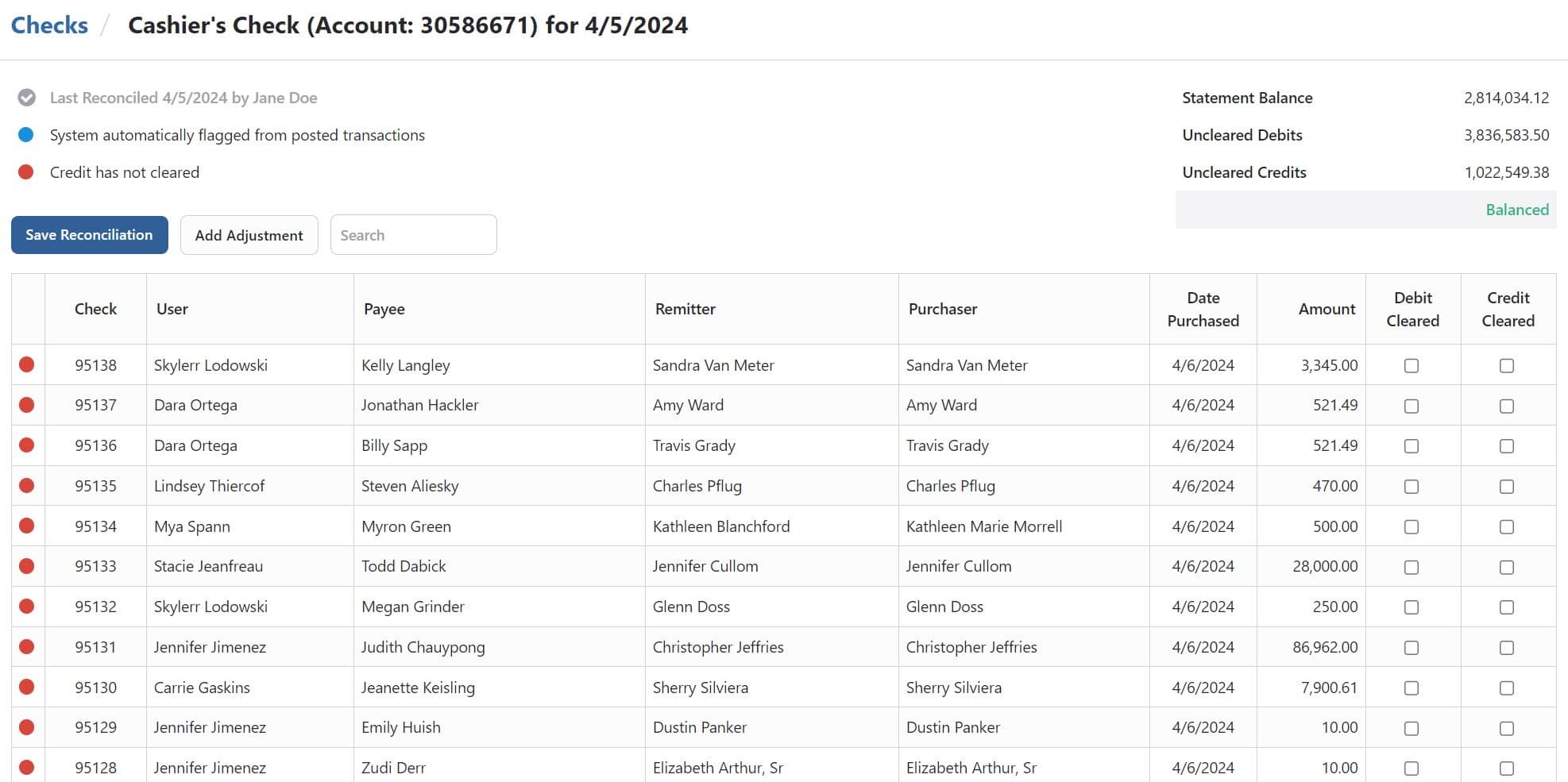
Each check type reconciles against its own internal deposit or general ledger account. BNControl marks the debits and credits that have already posted, leaving you the items that have not, and shows the statement balance against uncleared debits and credits.
Search or sort by amount, tick items off against the statement, and add adjusting entries without leaving the reconciliation.
- A reconcile account per check type
- Posted items selected for you
- Statement balance against uncleared
- Balance shown as you work
- Adjusting entries added in place
- Every reconciliation saved
Maintenance and Voiding
A check entered wrong can be corrected. Search by check type, date range, check number, or amount, open the check, and change what needs changing. Every edit is kept on that check's own change log with who made it and when.
Voiding asks for a reason and records it. A check type can be set to allow a voided number to be reissued, for stock that has to be accounted for one number at a time. Maintenance and voiding are each their own permission, separate from issuing.
Any issued check can be looked up by number and verified. It comes back with everything recorded when it was issued, which confirms the printed check has not been altered, and it can be reprinted by the users given that permission.
- Search by type, date, number, or amount
- A change log on every check
- Voiding records a reason
- Voided numbers reissued where allowed
- Verify an issued check by number
- Reprinting is its own permission

Counter Checks
Counter checks are printed for a customer who needs a few checks at the branch. Enter the account, and the names, the address, and the account number to print are auto-populated. Choose how many to print, who received them, and the fee.
Numbers can increment on their own, carry on from the last number used on that account, or repeat. A limit can be set on how many checks one account may be given, and going past it needs its own permission. A reason can be required and stays with the record.
- Details pulled from the account
- Several checks to a page
- Numbers incremented or repeated
- Continue from the last number used
- A limit per account, with an override
- A reason recorded on every batch

Cash Purchases
Whether cash was used to buy the check is recorded on the check itself. That is what lets your compliance team find the monetary instrument purchases worth a second look, rather than reading through every check that was issued.
A check type can cap the cash amount a non-customer may present, and going over that cap takes a separate permission. Non-customer sales collect the address, the date of birth, and the identification type and number, which is the information a later review needs to have.
- Cash purchases marked on the check
- A cash cap for non-customer sales
- Exceeding the cap needs permission
- Address, date of birth, and ID recorded
- Payees screened against OFAC
- Everything issued exportable for CIP
Reporting
Five reports cover the module. Checks Sold lists what was issued, for balancing the internal account and for BSA work. Check Reconciliations returns the saved reconciliations for each check type. Voided Checks and Counter Checks each cover their own date range, and Checks for CIP exports everything issued for research or screening.
Escrow disbursements run the other way. The Escrow Payment Disbursements report creates the checks, and any check type marked eligible for escrow can be used, so a type set aside for escrow keeps those disbursements apart from the rest.
- Checks Sold for balancing and BSA
- Check Reconciliations by check type
- Voided Checks by date range
- Counter Checks by date range
- Checks for CIP exported in full
- Escrow disbursements that create checks
Your Stock, Your Layout
Fields go where your check stock needs them, down to the prefix on the amount line and the MICR symbols around the routing number, so blank stock prints as cleanly as pre-printed.
Screened Before It Prints
Payee, purchaser, address, and identification go against the OFAC list as the check is created, and the check type can refuse to issue until someone confirms the result.
Nothing Unaccounted For
Every check keeps its change log, its void reason, and whether the debit and credit cleared, so the reconciliation and the audit come off the same record.
Are you ready for a demo?
See BNControl for yourself. We'll show you the modules you're interested in and answer questions along the way.