Flex Forms
Streamline any process.
Build a form in minutes, route it through approval steps, and get a report on every submission. Replace paper, PDFs, and email chains.
Create Any Form
A Flex Form replaces the PDF that gets emailed around, the paper that gets lost, and the process nobody can see the state of. Name the form, add the questions, and it is ready to use. Every form comes with its own report, so what was submitted is on the record from the first one.
Forms are organized into groups you define - Loans, HR, IT, Compliance - and permission is granted per group. Drag a field to move it, copy one to reuse it, and add statuses, approval steps, and notifications when the form needs them.
- Build a working form in minutes
- Organized into groups you define
- Drag to reorder, copy to reuse
- A report for every form, automatically
- Statuses and steps when you need them
- Nothing to code and nothing to install

Start From a Template or a Blank Page
Adding a form offers four ways to start. Begin from scratch, begin from one of twenty-one templates and change whatever you like, upload a form you already have as a PDF, Word, or Excel file, or link to a web form that lives somewhere else. All four sit in the same list for the user.
A template is a starting point rather than a fixed form. It arrives with its questions, answer types, and statuses already set, and everything on it can be renamed, reordered, or removed. Most of them came from forms our customers built first.
The templates cover the forms most teams end up building anyway - account worksheets, address changes, debit card disputes, beneficial ownership, HMDA collection, customer complaints, suspicious activity, teller cash outages, time off requests, and more.
Use AI to describe a form instead of building it by hand - see it in action.
- Start from scratch or from a template
- Upload a PDF, Word, or Excel form
- Link to a form hosted elsewhere
- Every template is fully editable
- Attach reference documents to a form
- Hide a form until it is ready to use
- Copy a form or move it to another group
- Archive instead of delete, and unarchive later
Questions and Fields
Dozens of answer types cover what these forms actually ask for. Alongside text, dates, checkboxes, and yes or no, the select lists are wired to your own data - officers, branches, markets, and every product group you offer - so a form never holds a stale list of choices.
Account Number and TaxID fields do more than validate. Point a question at an account and the fields around it fill themselves in from the customer, the loan, the deposit, the safe deposit box, and your user-defined fields, so the teller is not retyping what you already know.
- Dozens of answer types
- Select lists drawn from your own data
- Auto-populate from an account or TaxID
- Internal-use fields for back-office work
- Custom answer types shared across forms

Conditions
A form only has to ask what applies. Conditions decide when a question appears and when it is required, built from the answers already given - a loan question shows up for a loan, a deposit question for a deposit.
The operators follow the field. Text fields offer contains, is one of, and has a value. Numbers and dates offer the comparisons. A question can also be controlled by where the form sits in its process, so compliance notes appear on the compliance step and an approval comment becomes required only on the final one.
A hidden question is not just out of sight. It is skipped by validation, left off the printed form, and cannot block a submission. Once you have written a rule, a checklist offers to copy it to the other questions that need it.
- Visibility conditions decide what appears
- Required conditions decide what must be answered
- Operators matched to the field type
- Conditions on the step or the status
- Hidden fields never block a submit

If you can describe the process, you can build the form.
Computed Fields
Some answers should not be typed. A computed field works out its value from what the user entered and saves it with the form. Assign a variable to a question, write the expression, choose the output format, and test it right there with sample values before anyone sees it.
The expressions handle arithmetic and order of operations, conditionals, and text. Date functions add days, months, years, or business days, and can work from the current date or the date the form was submitted, so a follow-up date thirty business days out is a field rather than a calculation someone does in their head.
A computed field can also drive a barcode on the PDF, so a document management system can identify what it just received without anyone indexing it by hand.
- Arithmetic, conditionals, and text
- Date math including business days
- Currency, number, and date formats
- Test the expression before saving
- Usable as the source for a condition
- Barcode fields for document management

Statuses
Turning on statuses turns a form into something that gets worked. Pending and Complete are there to begin with, and you add whatever the process needs - Under Review, Approved, Denied. More than one status can count as complete, so a denial closes the form as cleanly as an approval.
Choose the users and groups eligible to change the status and the form lands in their Pending Forms list. The submitter can be asked, or required, to send it to a particular person or group, and a form sent back for correction returns to the user who started it.
- Statuses named for your process
- Pending forms waiting on the home page
- Send to a specific user or group
- Send a form back for correction
- Hold a form and finish it later

Form Steps
When a form has to pass through more than one desk, steps put the sequence on the record. Name each step, say which statuses it can be set to, and name the users or groups who work it. The form moves down the list, and everyone can see where it currently sits.
Each step can have its own instructions, and questions can be tied to the step that needs them, so a reviewer sees the fields that are theirs rather than the whole form. Steps can be reordered, and renaming one updates every rule that points at it.
- A named sequence of steps
- Users and groups assigned per step
- Statuses limited to what fits the step
- Instructions shown on the step
- Questions scoped to the step
- Reorder steps without rewriting rules

Notifications
Notifications keep a process moving without anyone chasing it. Email the people eligible to change the status, the user who submitted the form, or a list of addresses that has nothing to do with either, and choose separately whether each of them hears about a submission, a field change, a status change, and a completion.
Pick which answers are included in the email so the reader knows what came in without opening the form, and leave the sensitive ones out. Put the form ID in the subject line to use it as a ticket number, or attach the whole form as a PDF. A summary panel spells out who will be emailed for each event before you save.
- Separate rules per audience and event
- Additional addresses outside your user list
- Choose the fields shown in the email
- The form attached as a PDF
- A reminder before the due date

Signatures
Sign without printing. Signature lines go anywhere on the form, labeled for whoever is signing, with optional footer text and a date beside the line. They are included on the printed copy, and a form can hold as many as the process calls for.
With a signature pad the customer or employee signs while the form is still in front of them and the signature is stored with the record. Pads also allow a signature to be marked required, or marked internal use so it is collected after the form has been submitted rather than at the counter.
- Several signatures on one form
- Customer and employee signature lines
- Required and internal-use signatures
- Stored with the form, printed with it

A Report for Every Form
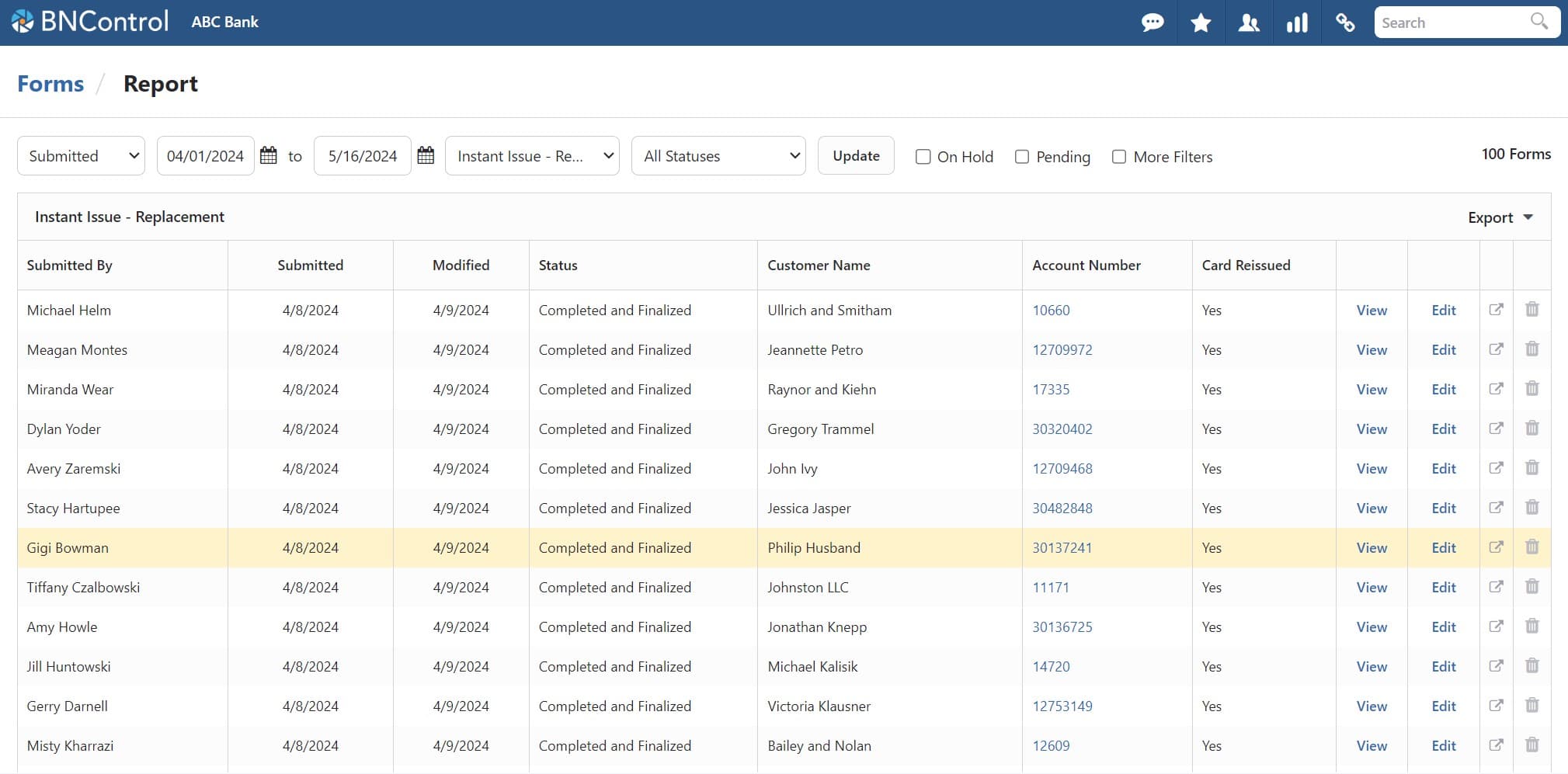
Every form you build gets a report without anyone asking for one. Search by date range, status, or form type, open a submission, edit it, reprint it, and export the whole thing to CSV or PDF.
The report is a Flex Report, so the columns, filtering, grouping, aggregates, and saved layouts described there apply here too. Numeric answers can total in the footer, and report field grouping puts several questions onto one column, so a question that was reworded or replaced as the form changed still reads as a single column across a year of submissions.
- A report per form, built automatically
- Search by date, status, or form type
- Full Flex Report layouts and filtering
- Totals on numeric answers
- Group fields into a single column New
- Export to CSV and PDF
Seamlessly Integrated
A form that collects an account number or a customer shows up on that customer in CRM, alongside everything else on the relationship. The complaint that was logged last spring is on the customer's page rather than in a folder somebody has to remember.
A form can be linked to an audit type, so a review is completed on a custom form while the findings and exceptions are documented in Audits. Forms can be sent out to users or groups to complete, arriving on hold on their forms page, and a Flex Letter can be printed straight from a submitted form.
- Submitted forms shown on the customer
- Forms linked to an audit type
- Send a form to users or groups to complete
- Print a Flex Letter from a form
- Attachments uploaded and appended to the PDF
- Favorite the forms you use daily
Permissions and the Record
Permission is set on the form group and answers four questions separately - who can submit, who can edit, who can delete, and who can view the report. A lending group can be given every lending form in one move, and an individual form can override the group where it needs to.
Every change to a submitted form is logged with the field, the old value, the new value, the user, and the time. Forms are archived rather than deleted, so a form that is out of use stops appearing without taking its history with it, and the PDF can include the logo, who submitted it, the change log, and the uploaded attachments.
- Submit, edit, delete, and report separately
- Set on the group, overridden per form
- A change log on every submitted form
- Archive rather than delete
- Change log printed with the PDF
- One submission per user where it matters
Forms Our Customers Built
A small sample of the forms our customers have built to replace a process that used to run on paper and email.
Operations
- Account Worksheets
- Address Change
- Debit Card Disputes
- Debit Card Replacement
- Hold Form
- Overdraft Refund Approval
- Stop Payment Request
Lending
- Appraisal Requests
- HMDA Data Collection
- Instant Issue Request
- Loan Exception Request
- Rate Lock Request
Compliance
- Beneficial Ownership Certification
- CIP Verification
- CTR Documentation
- Customer Complaint Log
- Suspicious Activity Form
Human Resources
- Accident Report
- Company Event RSVP
- Employee Feedback Form
- New Hire Onboarding Checklist
- Time Off Request
Information Technology
- Access Request
- Equipment Request
- Incident Report
- IT Morning Checklist
- Software Installation Request
And More...
- Board Resolution
- Branch Cash Count
- Marketing Request
- Vendor Evaluation
- ...anything you can think of!
Save Time
A request that used to take days of forwarded email now moves through named steps, with everyone notified and the current owner obvious to anyone who looks.
Eliminate Paper
Digital forms cannot be lost, cannot be illegible, and fill in what you already know. Signatures are captured on the spot rather than printed and rescanned.
Stay Audit-Ready
Every submission is timestamped, logged, and reportable. When an examiner asks how a process works, the answer is a report rather than a search through a filing cabinet.
Are you ready for a demo?
See BNControl for yourself. We'll show you the modules you're interested in and answer questions along the way.